
Practical automation for everyday life and side projects.
Turn your repetitive tasks into self running workflows.
HeyJeff.IT builds smart automation systems that eliminate repetitive work across email, file management, CRM, and business processes no technical skills required. Start with a ready-made solution or get a custom-built system designed around your needs.
Average user saves 10+ hours every week after the first month.











Helping creators, freelancers, and productivity buffs get more done
“Our inquiries went up 40% after Jeff launched our new funnel clients now find and book us with ease.”
Tobi T.
AV Editing
“His automation setup cut our manual follow-up time by 10+ hours per week and boosted lead response instantly.”
Luke F.
FAXSTRIVE
“Jeff rebuilt our funnel, and we saw a 150% jump in booked calls within the first month.”
Jaghr D.
Scholars Blueprint
Trusted by Makers & Freelancers
Helping busy professionals automate workflows and get more done, effortlessly.






Why automate with HeyJeff.IT?
Designed for regular people who want the power of automation without the overwhelm of learning to code.
For non-technical people
Explain your routine in plain language. We translate it into stable automations using tools like Zapier, Make, GoHighLevel and your existing apps.
Built around your life
Automate admin and digital clutter: from organizing files and tracking habits to dimming lights when Netflix starts.
Done-for-you setup
I take care of everything for you design, build, test, and document so you get a ready-to-go automation.

This automation watches incoming Gmail emails, detects attachments, uploads files for analysis, automatically generates structured file names, stores them in Google Drive, logs the details into Google Sheets, and optionally sends confirmation emails.
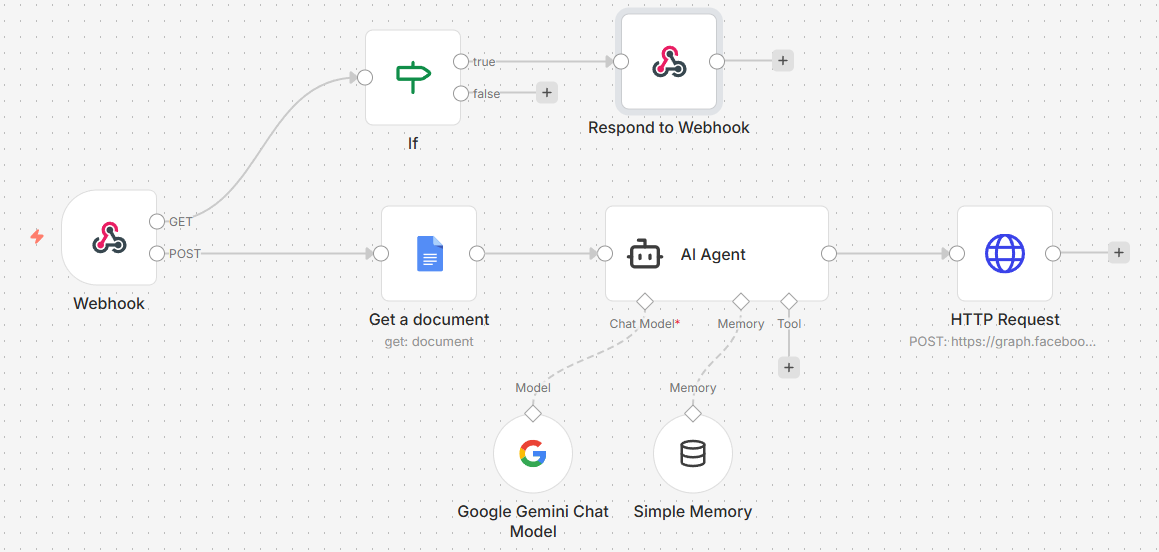
This workflow uses a webhook to receive incoming messages (e.g., from Facebook Messenger or a website form), pulls answers from a Google Docs knowledge base, processes the request through an AI Agent (Google Gemini), and sends a response back automatically via HTTP request (Facebook Graph API).
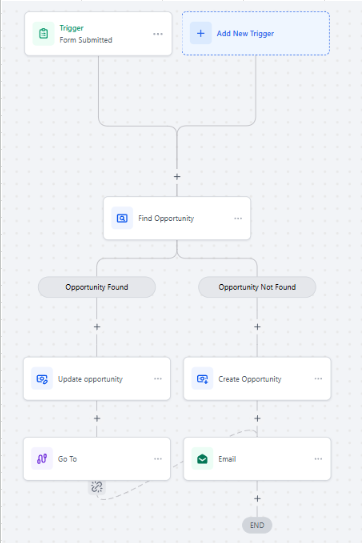
When a form is submitted, the system checks if an opportunity already exists. If found → it updates the opportunity. If not found → it creates a new opportunity and triggers follow-up actions like sending emails.
Your new automation,
in 3 steps.
From idea to working automation in days, not months. You stay in control while we handle the tech.
No commitment on the call we map opportunities, then you decide what to automate first.
1. Map your routine
On a short call or async questionnaire, you describe what you do, where you waste time and which apps and devices you already use.
2. Design & build
We propose a simple automation blueprint, agree on tools and triggers, then build it out with safety checks, logs and fallbacks.
3. Test & handover
You test-drive your new workflows. We tweak edge cases and record a short video showing how to monitor, pause or extend everything.
Questions, answered.
If you’re new to automation or have a complex setup already, we’ll meet you where you are.
Do I need to be technical to use this?
No. Most clients describe their routines in normal language: “When I get a new bill, put it here and remind me before it’s due.” We suggest tools, build the workflows and show you how to trigger or pause them in a couple of clicks.
What tools do you build automations with?
We start with tools you already use: Google Workspace, iCloud, Notion, Trello, Todoist, Apple Shortcuts, and no-code automation platforms like Zapier and Make. For advanced setups, we can connect APIs, webhooks and scripts where it makes sense.
Will my data be safe?
We use secure connections (OAuth, API keys stored on your side) and follow the principle of least access automations only see what they need. You can revoke access at any time, and we document exactly which connections exist.
How long does it take to get something live?
A simple Starter Automation is usually live within 5-7 business days after the mapping session. Life OS Bundles or complex smart home setups can take 2–4 weeks depending on tools and hardware.
What happens if something breaks later?
Most issues are caused by passwords changing, tools being removed or new devices being added. Starter includes 7 days of tweaks; Life OS includes 30 days. After that, you can book a one-off fix or ongoing maintenance if you prefer us to keep an eye on things.
Ready to stop doing the same tasks over and over?
Tell HeyJeff.IT what your day looks like. We’ll come back with a simple automation plan you can start this week.
No spam, no obligation just ideas for making your life run smoother.
HeyJeff.IT
Practical automation for individuals, creators and households.
© 2026 HeyJeff.IT · All rights reserved